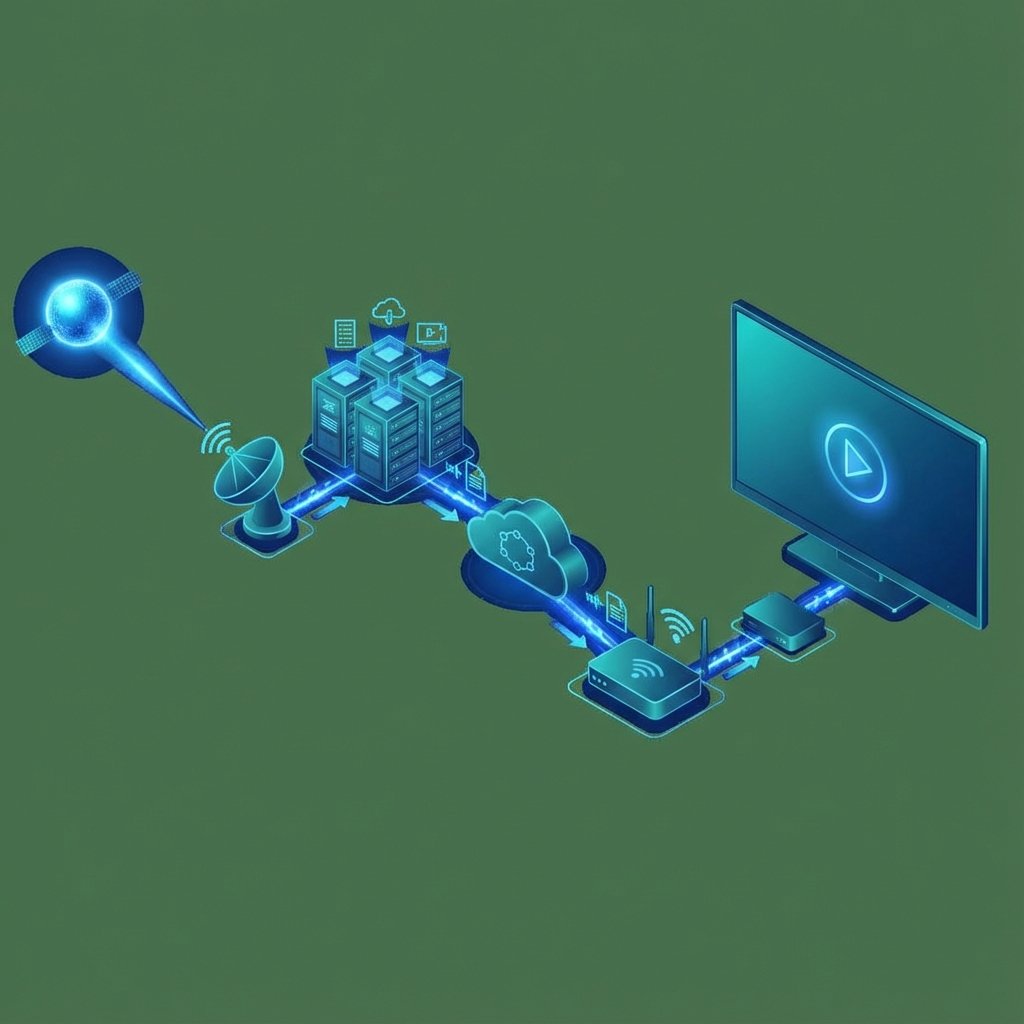
IPTV stands for "Internet Protocol Television" and represents a revolutionary way of receiving television content. Unlike traditional television, IPTV uses your Internet connection to deliver content directly to your device.
The Step-by-Step Process
1. Content Origin
Television channels transmit their signal to central servers. This content can come from satellites, production studios, or Internet feeds.
2. Encoding and Compression
The video is encoded into digital formats (H.264 or H.265) and compressed to reduce the file size without significant quality loss.
3. Server Storage
Orvixa IPTV uses high-capacity servers geographically distributed to guarantee fast and stable connections.
4. Content Delivery Network (CDN)
A content delivery network delivers the video from the server closest to you, minimizing latency.
5. Your Device
Your FireStick, Smart TV, mobile, or computer receives the data packets, decodes them, and displays the video in real-time.
Types of IPTV Content
- Live TV: Channels broadcast in real-time
- VOD (Video on Demand): Movies and series available whenever you want
- Catch-up TV: Shows broadcast in the last few days
- Timeshift: Ability to pause and rewind live TV
Technical Requirements
- Internet: Minimum 10 Mbps (25 Mbps for 4K)
- Compatible device: Smart TV, FireStick, Android Box, Mobile, PC
- IPTV Application: IPTV Smarters, TiviMate, VLC, etc.
⚡ The Orvixa IPTV Advantage
Our servers use intelligent buffering technology that pre-loads content, practically eliminating buffering even on average speed connections.
IPTV vs. Traditional Cable & Satellite Architecture
While coaxial cable and satellite dishes broadcast every single television channel simultaneously to your receiver—requiring heavy RF modulation and proprietary set-top box tuners—IPTV operates on a switched packet-delivery model. When you select a channel on your IPTV player, your device sends an authenticated HTTP or RTSP request to the nearest edge server. Only the requested stream is transmitted to your home router, conserving bandwidth and enabling ultra-high-bitrate 1080p Full HD and 4K HEVC feeds.
| Feature | Modern IPTV | Cable / Satellite TV |
|---|---|---|
| Signal Delivery | Fiber/Broadband IP Packets (CDN) | Coaxial RF / Geostationary Satellite |
| Hardware Needed | Smart TV, Firestick, Apple TV, Mobile, PC | Rented Proprietary Coax/Dish Receiver |
| Weather Sensitivity | Immune to rain fade or dish alignment | Susceptible to storms and signal loss |
| Interactive Features | XMLTV EPG, 7-Day Catch-Up, Cloud VOD | Limited local DVR hard drive storage |
Middleware, M3U Playlists & Xtream Codes API
To organize 28,000+ live channels and on-demand titles, IPTV platforms rely on middleware management systems. Users connect their player app using either a static M3U playlist URL or an authenticated Xtream Codes API profile. Xtream Codes separates authentication, live channel categorization, VOD metadata, and Electronic Program Guide (EPG) XMLTV schedules into fast JSON API endpoints, allowing instant startup on modern Smart TVs.
Frequently Asked Questions
Does IPTV work with my existing home internet router?
Yes. IPTV works over any standard fiber, cable, or fixed-wireless broadband router without special port forwarding. For 4K live sports, we recommend connecting your TV via Ethernet or 5 GHz Wi-Fi.
Do I need a satellite dish or coaxial cable outlet for IPTV?
No coaxial wiring or outdoor dish installation is needed. All live broadcasts and on-demand movies stream directly through your internet connection to your Smart TV or streaming stick.