
Quick Answer: To reduce IPTV buffering, switch from Wi-Fi to a wired Ethernet connection, change your device DNS to Cloudflare (1.1.1.1) or Google (8.8.8.8), and increase your media player’s buffer size to 3–5 seconds (Medium buffer). If buffering occurs exclusively during live evening sports, your ISP may be throttling streaming ports—running a VPN or changing streaming formats often restores full throughput.
Few experiences are more frustrating than having a live football match or high-stakes movie freeze right at a pivotal moment. Because IPTV delivers real-time live video feeds rather than pre-downloaded progressive files, playback demands continuous, stable packet throughput. Understanding the physical and network path between your provider’s content delivery network and your screen allows you to systematically identify and eliminate playback hiccups.
Table of Contents
- The 4 Primary Causes of IPTV Buffering
- 5-Minute Diagnostic Checklist
- Fix 1: Eliminate Wireless Packet Loss with Ethernet
- Fix 2: Optimize Media Player Buffer Cache
- Fix 3: Switch to High-Performance Public DNS
- Fix 4: Combat ISP Traffic Shaping & Peering Congestion
- Fix 5: Clear Device RAM and App Cache
- Verifying Throughput and Latency Metrics
- Responsible Streaming Policy
- Frequently Asked Questions
The 4 Primary Causes of IPTV Buffering
Live television buffering happens when your player’s playback buffer empties faster than new video packets arrive. This failure occurs at one of four critical bottlenecks:
- Local Wi-Fi Interference: RF congestion, physical obstacles, and band switching create momentary micro-dropouts that disrupt UDP live video streams.
- Player Buffer Underrun: When a player is configured with zero buffer (instant playback mode), even a 50-millisecond network jitter spike forces the player to pause.
- ISP Throttling & Restrictive Routing: Internet providers often prioritize web traffic over persistent high-bitrate UDP streaming video during peak evening hours.
- Server-Side Capacity: Substandard IPTV providers host thousands of users on underpowered nodes that choke during major international events.
5-Minute Diagnostic Checklist
Before changing deep router settings, run through this rapid troubleshooting triage:
- Reboot your Wi-Fi router and modem by disconnecting power for 30 seconds to flush corrupt NAT tables.
- Power-cycle your streaming box or smart TV to clear operating system RAM.
- Test a different channel category or on-demand movie. If VOD plays smoothly but live channels buffer, the issue is live stream latency rather than total download bandwidth.
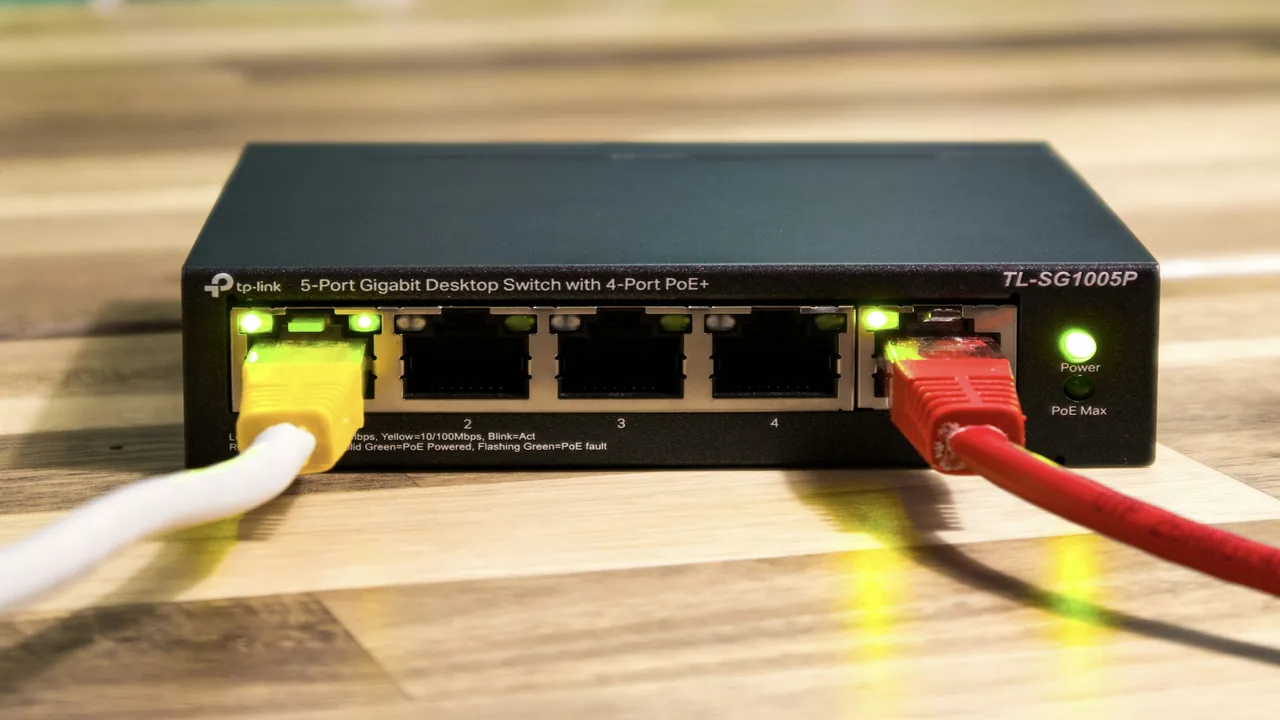
A direct Cat6 cable connection provides deterministic bandwidth with zero wireless radio interference.
Fix 1: Eliminate Wireless Packet Loss with Ethernet
Wi-Fi is convenient, but it is inherently half-duplex and susceptible to interference from neighboring networks, microwave ovens, and physical walls. Replacing Wi-Fi with an RJ45 Ethernet cable immediately eliminates jitter spikes:
- Connect a Cat6 Ethernet cable directly from your router or network switch into your streaming box, smart TV, or PC.
- If running a direct cable through walls is impractical, consider high-speed Powerline AV2 adapters or MoCA 2.5 (Ethernet over Coax) adapters.
- If you must use Wi-Fi, always connect to the 5 GHz band rather than 2.4 GHz. Read our detailed comparison of Wi-Fi vs Ethernet for IPTV and explore 2.4 GHz vs 5 GHz Wi-Fi performance.
Fix 2: Optimize Media Player Buffer Cache
Most advanced IPTV players allow you to adjust the pre-playback buffer length. A larger buffer gives your connection time to recover if a packet is momentarily delayed:
- TiviMate: Navigate to Settings → Playback → Buffer Size. Change the value from None to Medium (3–5 seconds). For unstable connections, select Large.
- IPTV Smarters Pro: Go to Settings → Player Settings. Change buffer size from Normal to High.
- IPTVX (tvOS/iOS): Navigate to Settings → Advanced → Player Cache and increase playback buffer threshold.
Fix 3: Switch to High-Performance Public DNS
Standard internet service provider (ISP) DNS servers are frequently slow and subject to restrictive routing filters. Updating your device or router DNS to enterprise-grade resolvers dramatically speeds up stream domain lookups:
- Cloudflare DNS: Primary:
1.1.1.1| Secondary:1.0.0.1 - Google Public DNS: Primary:
8.8.8.8| Secondary:8.8.4.4 - Quad9 DNS: Primary:
9.9.9.9| Secondary:149.112.112.112
Fix 4: Combat ISP Traffic Shaping & Peering Congestion
Does your buffering occur exclusively between 7:00 PM and 11:00 PM or during major sporting broadcasts? Many consumer ISPs deploy deep packet inspection (DPI) to throttle sustained video connections. Explore our in-depth analysis on why IPTV channels freeze at certain times and learn how network privacy tools can help in our guide on whether IPTV requires a VPN.
Fix 5: Clear Device RAM and App Cache
Streaming apps continuously store electronic program guide data, channel icons, and stream fragments. Over time, accumulated cache exhausts memory on devices like the Firestick or Android TV:
- Go to Settings → Applications → Manage Installed Applications.
- Select your IPTV player and click Clear Cache (do not click Clear Data, which wipes your login).
- Uninstall unused apps to ensure at least 1 GB of free internal flash storage remains available for operating system swap operations.
Verifying Throughput and Latency Metrics
Download speed alone is not enough; latency (ping) and packet jitter are equally vital for real-time video feeds. Review our technical guide on recommended internet speeds for IPTV to evaluate your connection against our benchmark standards.
Responsible Streaming Policy
Orvixa IPTV supplies high-capacity digital delivery infrastructure. Subscribers are responsible for ensuring that all streams accessed through their third-party player applications comply with applicable regional copyright laws and broadcast licenses.
Frequently Asked Questions
Will increasing download speed from 100 Mbps to 1 Gbps stop buffering?
Not necessarily. A 4K stream only uses 25 to 40 Mbps. If buffering is caused by Wi-Fi packet loss, high latency, or ISP throttling, upgrading your plan speed without addressing network stability will not resolve the problem.
Why does one channel buffer while other channels work fine?
Channels are sourced from different feed decoders. If an individual feed encounters transcode difficulties at the broadcast source, other channels in your playlist remain unaffected. Report the specific channel to customer support.
Say Goodbye to Buffering Headaches
Experience ultra-low-latency sports and international channels backed by redundant high-speed server clusters.
Test Orvixa IPTV With a Free 24-Hour Trial
Experience 28,000+ live US & international channels, 4K/Full HD sports, and VOD on your Smart TV, Firestick, or mobile device before you commit.